Marble Filament: How 3D Prints Get That Stone Look
What marble filament is, how the speckled stone effect works, which objects it flatters most, its limits, and how to order a marble 3D print from a studio.
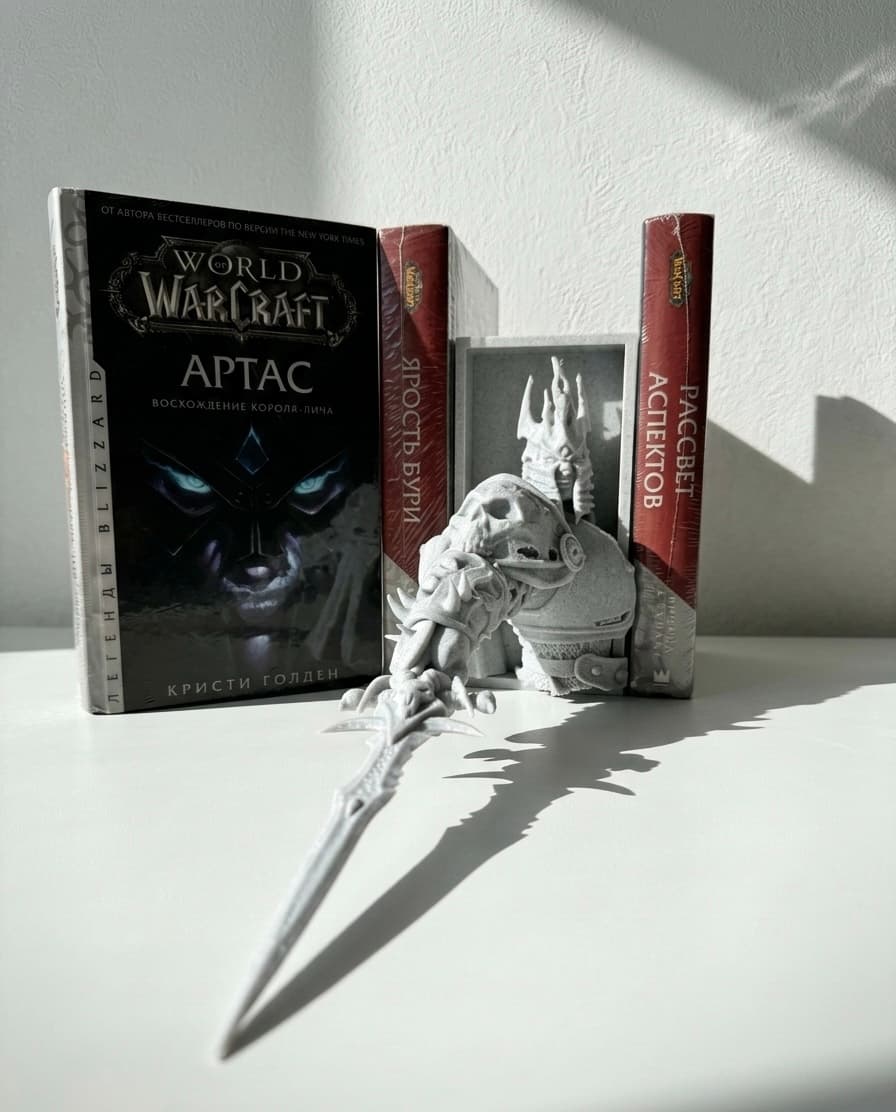
Some of the most photographed pieces Fantasy Lab 3D has made, including the Arthas book nook and the 1:1 Arthas helmet, were printed in marble filament. People often ask whether the object is stone, ceramic or plaster. It is plastic, but a clever one. This post explains what marble filament actually is, why it looks the way it does and when it is the right choice for your order.
What marble filament is
Marble filament is ordinary PLA (the plant-based plastic most decorative prints use) with fine dark particles mixed in during manufacturing. As the printer melts and lays down the plastic, those speckles end up scattered through every layer. From a normal viewing distance the eye reads the random dots as veining and grain, exactly like polished marble, granite or terrazzo.
It is not a coating and it does not wear off. The effect goes all the way through, so a chipped corner still looks like stone.
Common variants:
- White or pale grey base with black speckles (the classic marble)
- Warm beige with brown flecks (sandstone or travertine look)
- Dark grey base with pale flecks (closer to granite)
- Tinted versions in green, pink or blue for a more decorative finish
Why it hides layer lines so well
Every FDM print is built from stacked layers, and on a plain colour those layers are visible as faint horizontal lines. On marble filament the random speckle pattern breaks up those straight lines visually. Your eye latches onto the dots rather than the layer boundaries, so a marble print at 0.2 mm layer height can look smoother than a plain white print at 0.12 mm.
That makes marble a favourite for larger objects where sanding every surface would be expensive: statues, busts, architectural elements, book nook walls and helmets. If you want a truly smooth surface on a plain colour instead, see our guide to removing layer lines.
Where marble looks best
The effect works on anything that could plausibly be stone in real life.
| Object type | Why marble suits it |
|---|---|
| Book nook walls, arches and columns | Reads as carved stone, matches fantasy settings like Moria or a Warhammer cathedral |
| Busts and statues | Classic museum look without paint |
| Vases and planters | Looks like ceramic or concrete, pairs well with plants |
| Helmets and armour props | Weathered, ancient feel straight off the printer |
| Bookends, coasters, trays | Heavy, premium appearance for everyday objects |
Our Warhammer 40K book nook is a good example: the gothic ruins and skulls look like they were quarried rather than printed, and the piece needed no painting to look finished.
Where it does not help
Marble filament has real limits, and knowing them saves disappointment.
- Small, fine details get lost. On a miniature the size of a thumb, the speckles are too coarse and the figure looks noisy. Use plain PLA or resin for those.
- Text and logos become harder to read, because the dots compete with the edges.
- It cannot be dyed or lightly tinted later; painting covers the effect completely.
- Mechanically it behaves like standard PLA: fine indoors, not for parts that carry load, sit in a hot car or live outside in sunlight.
- The speckle pattern is random, so two prints of the same object are similar but never identical. Most customers love this; if you need exact matching across a set, mention it.
Marble versus other decorative filaments
If you are choosing a look rather than a specific material, compare marble with its siblings. Silk filaments add gloss and a metallic shimmer, matte filaments make prints look like moulded or painted plastic, and wood-fill adds a warm, grainy feel. Our field guide to special filaments covers them side by side. As a rule: marble for stone and ruins, silk for trophies and elegant vases, matte for modern minimalism, wood for rustic pieces.
Ordering a marble print
When you send a model to Fantasy Lab 3D, say that you want the marble look and, if it matters, which base tone (white, beige or dark grey). We will advise if the model is too detailed for the effect or if a different finish would serve it better. Print settings are slightly different for marble: a standard 0.4 mm nozzle works, layer heights from 0.16 to 0.24 mm show the pattern well, and slightly thicker walls help larger pieces feel solid in the hand.
The price of a marble print depends on the object's size, the amount of material used and whether any finishing is requested; the filament itself is only modestly more expensive than plain PLA, so most of the cost still comes from print time.
Ready to order?
If you have a model that deserves to look like it was carved rather than printed, marble filament is probably the answer. Send us the file or describe the idea through the contact form, or DM us on Instagram at @fantasylab3d.almaty, and we will send a quote and a recommendation on tone and layer height.
- #marble filament
- #materials
- #pla
- #3d printing
- #decor
- #book nook
Want this printed?
Send us a link, a file or a rough idea. We reply with a quote and a realistic timeline.